
Whether you are planning a trip to New York, Boston or the Caribbean with JetBlue, all your travel planning with the airline takes place in one spot: the booking management section of jetblue.com.
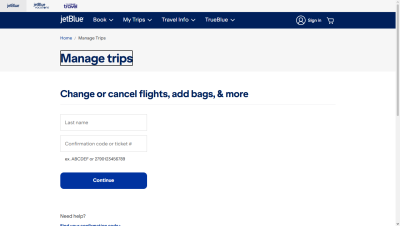
Find your booking
To access your booking details, you need two pieces of information:
First, go to www.jetblue.com and select “My Trips.” Then, in the login fields, enter:
- Your confirmation number. This is a short alphanumeric code received via email immediately after purchase. Be sure to check your spam folder as well.
- Your last name, exactly as it appears on the booking.
If you have a TrueBlue account, simply log in; your upcoming trips will appear automatically without needing to enter a code. If you have lost your confirmation number, you can also search using your ticket number or the email address used for the booking.
Understanding your fare before making changes
Before making any changes, identify your fare type (Blue Basic, Blue, Blue Plus, Blue Extra, or Mint).
JetBlue does not charge change or cancellation fees for most of its fares, with the exception of Blue Basic.
Official terms state that Blue Basic fares incur a $100 fee for flights within North America, Central America, and the Caribbean, and a $200 fee for other routes, plus any difference in fare.
However, some third-party sites claim that changes to Blue Basic fares are not permitted at all, depending on the purchase date.
Changing your flight
– Open your booking under “Manage Trips.” – Choose the modification option and select the relevant flight segments.
– Enter the new date and view the available flights.
Check the price difference. For Blue, Blue Plus, Blue Extra, and Mint fares, only the fare difference applies.
– Confirm any payment due, then wait for the new confirmation email.
Tip: Make the change before the scheduled departure time; otherwise, it will no longer be possible to do so online. If you use a phone or chat agent, a fee of approximately $25 per passenger may apply.
Canceling and requesting a refund
The golden rule is the 24-hour policy: any booking made at least one week before departure can be canceled without penalty up to 24 hours after purchase. This is the easiest way to get a full refund, regardless of the fare type.
After this period, expect a travel credit rather than a refund: cancellation results in a JetBlue credit valid for one year toward a future flight. Only refundable tickets are credited back to the original payment method.
One crucial point to remember: if you fail to show up without having modified or canceled your booking before departure (a “no-show”), the entire amount is forfeited. So, cancel, even at the last minute, rather than doing nothing.
Choosing or changing your seat
Open the cabin map within your booking. You can compare standard seats with those offering extra legroom (which often come with an additional fee). Depending on your fare, seat selection may be included, available for a fee, or automatically assigned at check-in. If you are traveling as a group or with children, select your seats as early as possible to ensure you sit together. 6. Requesting an upgrade
Check your booking management area to see if an upgrade option is available for your flight, such as extra-legroom seats or the Mint cabin on certain routes, subject to availability. TrueBlue members can sometimes use their points. Offers vary by route and fare type, so it is best not to wait until the last minute.
Online check-in and boarding pass
Check-in generally opens 24 hours before departure and closes about an hour beforehand.
– Click “Check in” within your booking details.
– Confirm passenger identities and, for international flights, travel documents.
– Add baggage if needed.
– Download the boarding pass to the app, then add it to your mobile wallet, or print it out. (Take a screenshot of your boarding pass in case the network goes down at the airport).
Track your flight
On the day of departure, check your flight status regularly. You will be notified of any delays, gate changes, or flight cancellations. You can search by flight number or route. Enable notifications in the JetBlue app to receive real-time alerts.