
Delta Airlines’ online check-in service is available on all its domestic and international flights.
Delta Airlines also offers passengers the option to download their boarding pass from home and then print it or save it to their smartphone.
Once they have their boarding pass, passengers can go to the airport and check in at the baggage drop-off counter or directly to the gate if they are traveling with carry-on baggage only.
After checking in, passengers can proceed to the gate or the baggage drop-off counter.
How can I check in online for a Delta Airlines flight
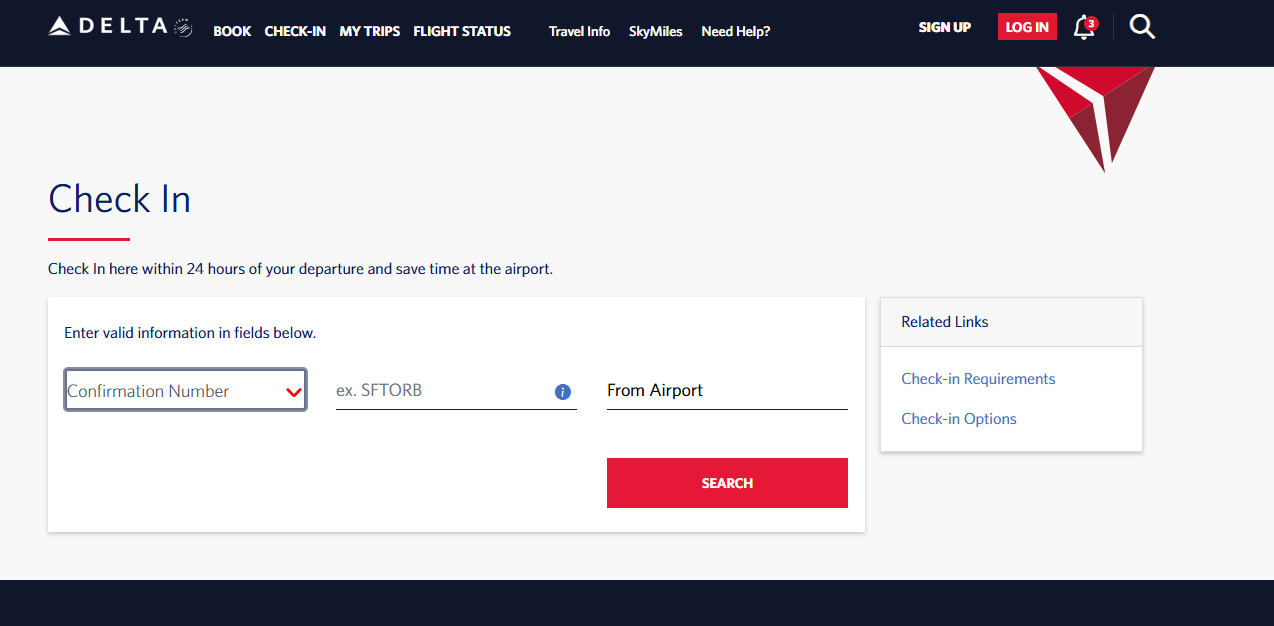
To use this service, passengers must log in to the airline’s mobile app or website (Delta.com).
Once logged in, the user simply enters their name and booking reference (or flight ticket number, Skymiles membership number, or the credit card number used to pay for the booking).
They then select the passengers they wish to check in, enter the required information, and choose one or more seats, depending on the number of passengers in their booking.
Once check-in is complete, the passenger immediately receives an email confirmation at the address provided. They can then print their boarding pass or save it to their smartphone.
After check-in, you can choose how to receive your Delta Airlines boarding pass:
– Digital version (stored in the Fly Delta app)
– Download as a PDF (stored on your smartphone)
– Add to Apple Wallet / Google Pay
– Print at home on A4 paper
– Print at a self-service kiosk at the airport
Services available during Delta Airlines online check-in
Delta Airlines flight check-in is a mandatory step that every passenger must complete to obtain their boarding pass. In the meantime, and before confirming their check-in, travelers can:
– Choose a preferred seat
Standard seats are randomly assigned to passengers when booking their flight, while preferred seats (seats located in the first few rows of the aircraft, window seats, or seats offering extra legroom) are sold separately. Passengers can select their preferred seat until the end of check-in, subject to availability.
Change seat selection after flight check-in
Yes, it’s possible, but please note that this service is only available to passengers traveling with a Main Basic reservation. Passengers who have booked a Main Basic ticket cannot change their seat selection after check-in closes.
Other services and options that can be added when checking in online for a Delta Air Lines flight:
– Add baggage
– Add visa information
– Add a special meal
– Request an upgrade
– Request priority boarding (Delta Sky Priority)
Delta Airlines online check-in not working?
Due to a computer malfunction, bug, or error in the Delta Airlines online check-in system, this service may be unavailable. In this case, and to avoid significant check-in delays, passengers should either contact the Delta customer service for assistance or arrive at the airport early and check in at the airline counter with the help of a Delta Airlines agent or complete the process at a self-service kiosk.
Delta self-service check-in kiosks
Similar to online check-in, Delta Airlines passengers can check in for their flights at self-service kiosks, where they can access their booking information via a touchscreen by logging into their traveler account using their last name and booking reference.
Once check-in is complete, passengers can print their boarding pass. They can then weigh their baggage at the same kiosk by scanning their boarding pass. The bag must then be placed on the integrated scale. The bag’s weight and dimensions are displayed on the screen.
In case of excess baggage, passengers must pay an excess baggage fee.
Try Delta curbside check-in service
This convenient service saves you valuable time at the airport, time usually wasted waiting in line at the check-in counters inside. Plus, Delta Air Lines curbside check-in is free, especially for passengers traveling with carry-on or checked baggage.
Passengers with oversized baggage must check in inside the airport by taking their suitcases to the designated oversized baggage handling area.
Delta check-in time
When can I check in for my Delta Airlines flight? Indeed, this question is frequently asked by passengers who are about to fly with this airline for the first time.
It’s important to know that online check-in with Delta Airlines is available 24 hours before the flight. Passengers have 23 hours to complete this process. This service typically closes at the same time as the airport’s check-in and baggage claim services (usually one hour before departure).
– 45 minutes before the departure of domestic flights
– 60 minutes before the departure of international flights.
Delta flight check-in and baggage drop-off deadlines at foreign airports
If you are an unaccompanied minor, a passenger traveling with a pet, or a service dog, or you are a passenger with reduced mobility, Delta Airlines requires you to check in at the airport. If you are traveling from an airport outside the United States, you should be aware that check-in deadlines may vary depending on your country of departure:
Accra – Kotoka, Ghana (ACC): 120 minutes before the flight
Athens – Eleftherios Venizelos, Greece (ATH): 120 minutes
Dakar – Blaise Diagne, Senegal (DSS): 90 minutes
Lagos – Murtala Muhammed, Nigeria (LOS): 90 minutes
Marrakech – Menara, Morocco (RAK): 90 minutes International to Turks and Caicos Islands (PLS): 90 minutes
Saint Lucia – Hewanorra (UVF): 90 minutes
Aruba – Queen Beatrix in the Caribbean (AUA): 75 minutes
Brussels – National in Belgium (BRU): 75 minutes
Dublin International in Ireland (DUB): 75 minutes
Frankfurt am Main in Germany (FRA): 75 minutes
Montreal-Trudeau in Canada (YUL): 75 minutes
Toronto Pearson in Ontario, Canada (YYZ): 75 minutes
Quebec City – Jean Lesage in Canada (YQB): 75 minutes
Nassau-Lynden Pindling in the Bahamas (NAS): 75 minutes
St. George – L.F. Wade in Bermuda (BDA): 75 minutes.