
On its booking platform – accessible via its website Jetblue.com and mobile app – the low-cost long-haul specialist lets you plan your trip from the comfort of your home.
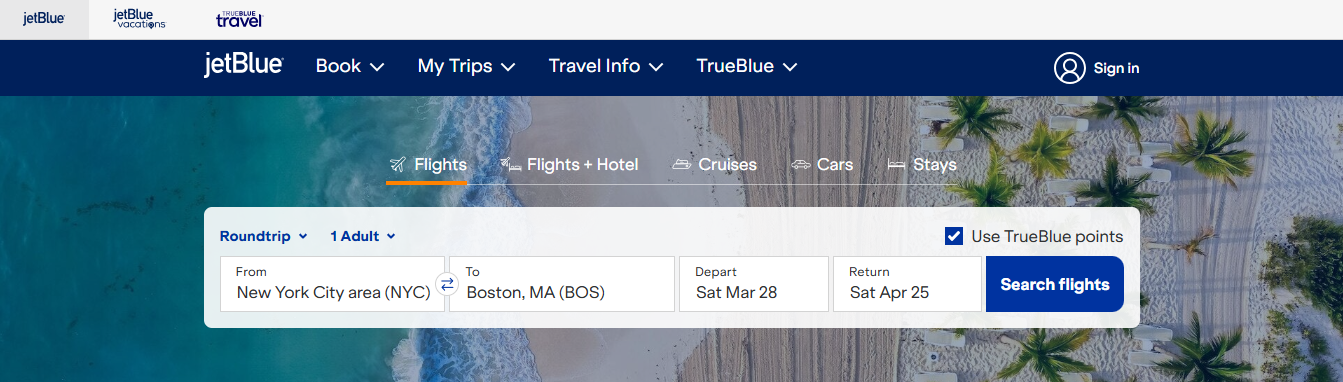
Using the flight search engine, you can filter hundreds of offers to find the ones that interest you.
Flight offers are sorted by:
– Departure airport and destination
– Departure date (one-way or round-trip).
Book a JetBlue flight with points
If you want to use your TrueBlue miles to book your next JetBlue flight, you must select this option in the search engine. You will then see the number of miles required to purchase the ticket, instead of the price in US dollars.
Start flight search
The offers generated by the search engine are displayed according to travel class with corresponding booking prices: Core, Economy, Premium Economy (Even More), and Mint.
If your flight search isn’t yielding the expected results, you can refine it further using the filters at the top of the offers page. For example, you can search for non-stop or connecting flights, or routes operated exclusively by JetBlue or partner airlines.
JetBlue Fare ranges
By clicking on the booking price, you can view the ticket fare and get more details on each fare option.
JetBlue offers four fare categories:
Blue Basic:
– This fare allows passengers to bring one piece of hand luggage free of charge.
Blue:
– Free carry-on baggage;
– Free seat selection;
– Free flight cancellation subject to conditions;
– Same-day switch (flight change): $75 fee applies
– Flight cancellations are subject to conditions, with a fee of $100 for flights to North America, Central America, and the Caribbean, and $200 for other destinations.
– Boarding after passengers who booked their flight with the Mint, EvenMore, or Mosaic fares.
Blue Plus:
In addition to the above benefits, you are entitled to:
– Free check-in of one piece of luggage on all routes.
Blue Extra:
All the privileges included in the Blue fare, plus:
– Free changes to your reservation up to the day of your flight
– Priority boarding
– Dedicated security lane (very fast)
EvenMore:
All the privileges granted to passengers who booked their flight with the Blue fare, plus:
– Free seat selection with extra legroom
– Free changes and cancellations to your reservation, no strings attached
– Carry-on baggage in a dedicated overhead compartment
– Premium snack
Mint:
In addition to the above privileges, you can:
– Check 2 bags free of charge.
Launch a combined Flight + Hotel search
With a simple search, you can view the best deals on discounted flights, as well as discounted hotel room rentals offered by partner establishments.
Find last-minute flights with JetBlue
Summer or winter, JetBlue continuously offers last-minute deals with exclusive fares.
You can visit Jetblue.com anytime or open the mobile app of this American low-cost airline to browse a wide selection of discounted destinations, bookable in just a few clicks: San Jose, Boston, Nashville, Punta Cana, Savannah, Detroit, Turks and Caicos, and many other enticing destinations.
Modify and update your JetBlue reservation
Do you need to access your JetBlue booking to correct an error, add a service (such as a meal or excess baggage), change your flight departure date or destination, or update your contact information? Go directly to the “Manage Trips” section and make the desired changes yourself.
Contact JetBlue reservations by phone
Need help booking your JetBlue flight, choosing a seat, adding baggage, or confirming your check-in? You can contact a JetBlue reservation agent by phone for assistance.
Reservation agents are available 24/7 to help you with every step of your booking, from finding deals to paying for your purchase and receiving your e-ticket.
– Call 1-800-538-2583 from the United States
Living outside the United States? Find a list of JetBlue reservation service phone numbers in your country here.