
American Airlines is constantly improving its services to offer its passengers a pleasant journey on board its aircraft. However, the airline knows that, well before the flight, plans can change for some travelers, to the point of having to postpone or even cancel their trip entirely.
In this context, American Airlines is flexible. Even better, it allows its passengers to make the necessary changes to their reservation without having to visit an AA office. All the steps can be completed online, via its website or mobile app, in the “Manage Trips” section.
Important to know: From 24 hours before departure, no changes to the flight, name or travel date are permitted.
Modify your American Airlines flight reservation in just a few clicks:
This service allows you to:
– Change your destination
– Change/Correct your name
– Cancel your flight
– Change your seat
– Add extra services: Additional baggage, special meals, etc.
– Request special assistance (wheelchair, portable oxygen concentrator, etc.)
Find your trip
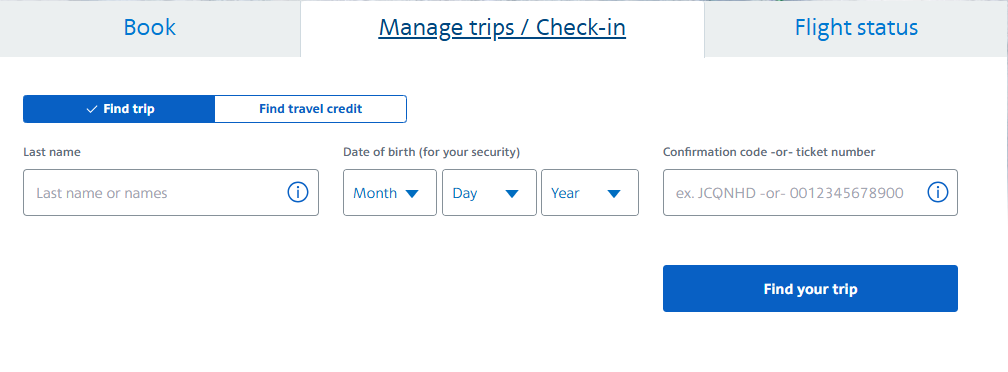
To do so: Go to the “Manage Trip” section and enter the passenger’s name and booking reference (or code confirmation. Ex: JCQNHD). Once the confirmation page appears, access flight availability and modify your trip.
This service applies to tickets purchased online or through the American Airlines mobile app.
Edit a travel credit
American Airlines also simplifies the procedures for travelers wishing to postpone or bring forward their booked flight with a travel credit (offered following a flight cancellation caused by the airline),
The service, which is accessible exclusively via the official American Airlines website and its mobile application, is reserved for tickets purchased online.
To access your account and have access to travel credit data, identify yourself with your:
– Name/first name
– Date of birth
– Travel credit number or ticket number (A 13-digit number, starting with 00115 or 0012).
With an incorrectly entered or misspelled name, your AA booking may be canceled.
A name transcription error must be corrected before the check-in deadline for the flight expires.
To expedite the change, passengers are encouraged to use AA’s Manage Booking online service.
After making the necessary correction to their name, passengers must confirm the change to reconfirm their booking. A new e-ticket will be issued within moments.
Name correction guidelines for American Airlines flight ticket reservations
– Minor corrections (Three Letters):
These are permitted only on flights operated by American Prime and American Eagle (except for R booking classes, which must adhere to the guidelines for major name corrections).
In the endorsement field, enter the following code: NC03AGCY/IU.
– Major name corrections (name change):
This may involve a complete name change due to a change in the passenger’s circumstances and marital status (e.g., marriage, divorce, etc.).
In the approval box, enter the following code: MAJORNC/IU.
– Correcting a baby’s name (Traveling on your lap):
Even if your baby is traveling with you on an American Airlines flight without a reservation, you must add them to your booking. However, if there is an error in their name, you must correct it before checking in for your flight.
For any request for correction or change of passenger name, go to ssofed.aa.com
Cancel an American Airlines flight reservation online
While the Manage My Booking section on the American Airlines website and mobile app makes it easy to modify your flight reservations, it’s also a convenient tool for canceling them.
A last-minute change of plans (illness, an unexpected incident, a job interview, etc.)? With American Airlines, there’s always a solution to exchange or cancel your ticket in just a few clicks.
You can exchange or cancel your tickets directly from the AA website or app, in the Manage My Booking section.
Exchange and refund conditions vary depending on the ticket type.